Recently we were asked by client to prepare an online CRM competency test . We are thinking which one layout is the better for the users. What is you opinion ?
Please leave your feedback in comments!

TOP 1 CRM BLOG
Recently we were asked by client to prepare an online CRM competency test . We are thinking which one layout is the better for the users. What is you opinion ?
Please leave your feedback in comments!
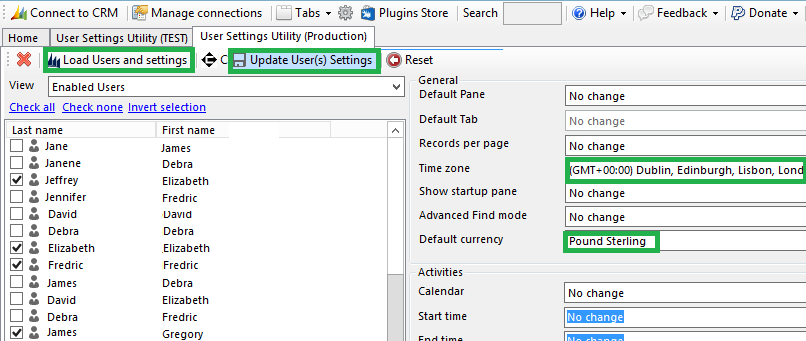
Because I receive many queries on Linkedin how to set up personal settings at D365 using User Settings Utility please find my answer in following post. I usually set up Personal Settings that way for CRM systems based UK. I hope it helps you – as a good example. I published one post about it on Linkedin as well. Here is url: https://www.linkedin.com/feed/update/urn:li:activity:6277245355968995328
I would like to introduce/recommend User Settings Utility for all readers . It is a part of XrmToolBox. That way you can easily set up the personal settings for ALL CRM users in ONE GO e.g. time zone (UK), default currency(Pound),… Recently this tool saved me a lot of time. It is a little thing, but it really makes a difference, doesn’t it ? – a CRM’ game changer.
Usually I set up these 7 Personal Settings for All users (UK based CRM systems) like on following screenshot:

1,2,3. General Settings at CRM

4,5,6. Email Settings at CRM
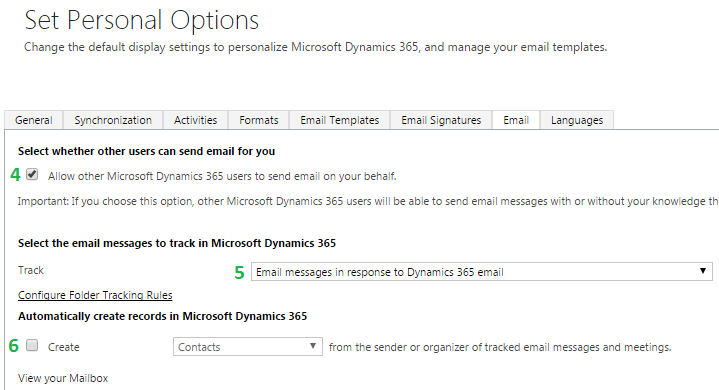
Particularly setting number 5 on my screenshots is very interesting. It is important in tracking emails. Shortly I will write a post about tracking emails related to Case at D365 – a good example to understand tracking emails at CRM.
5. Select the e-mail messages to track in Microsoft Dynamics CRM – the following summarizes the various options. I usually choose All e-mail messages rather than E-mail messages in response to CRM e-mail.
6. Automatically create record in D365
I usually select NO, because we don’t know for 100% sure it should be created automatically Contact or Lead, but I image it can depend of very specific requirements and you want to create Contact/Lead every time.
7. Error notification
I usually disable the errors notification to not frustrate the users. By the way I opened a very interesting discussion about it on Linked. Please look at this post.
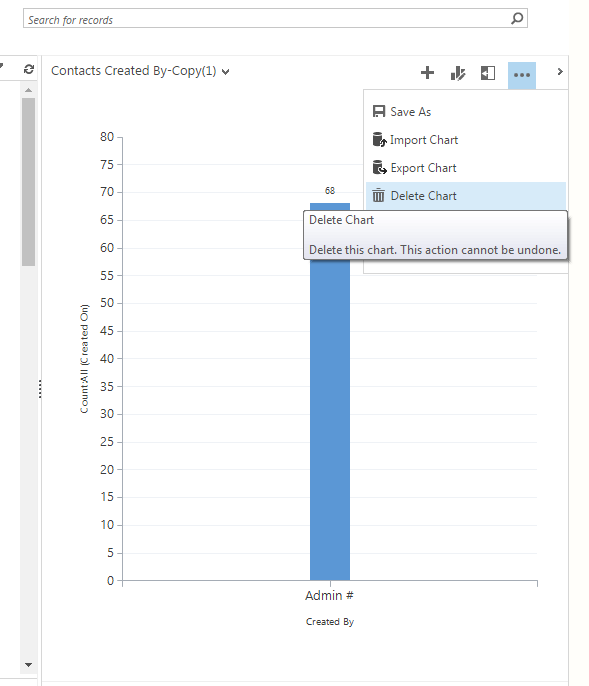
Charts in Microsoft Dynamics 365 are a very useful way to display data for
analysis.
User can easily:
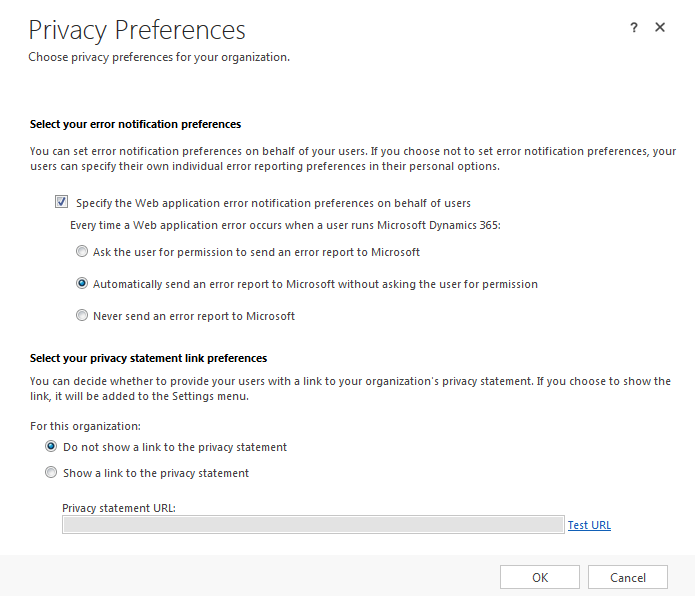
If you have any CRM presentations I would really recommend to disable the “Send Report to Microsoft” error pop-up. I saw users who were scared when they saw it. It is very easy to disable it.
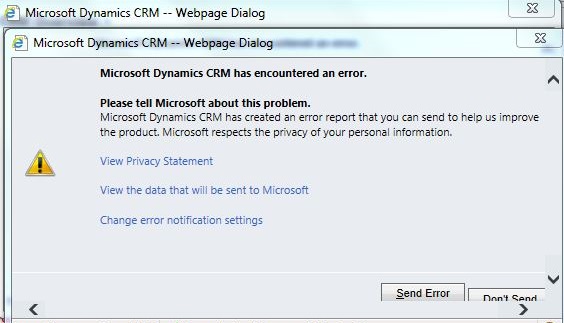
You can disable the Script Error Notifications in Dynamics 365 using following steps:
We have started very interesting discussion about it on Linkedin. Please look at this post. Here is url: https://www.linkedin.com/feed/update/urn:li:activity:6269476936607633408/
Other useful links:
https://community.dynamics.com/crm/b/crmtipsfromadeveloper/archive/2017/03/28/disable-the-script-error-notifications-in-ms-dynamics-crm-365
How to Disable the Script Error Notifications in Dynamics CRM 2015
If you have attended the increasingly popular CRM Saturday conference, you probably gained some valuable insights around the key aspects of delivering successful CRM implementations, and how to overcome the main challenges one may face during the implementation.
If not, I encourage you to visit the web site, it has great speakers, great content, and lots of networking opportunities… not to mention is one of the few Dynamics events out there where attendance is 100% free.
Two of the sessions were around test automation and how to implement a true DevOps strategy for Dynamics CRM, two key areas and best practices to increase the overall quality and healthiness of your CRM implementation, which, in turn, would give you the following benefits:
If you are still not convinced about why your team should unit test your code, here’s another blog post with the slides of the test automation presentation.
Once your team realises how important unit testing is, the next immediate question probably is:
“Ok, I have an implementation which has been running for years , and I have a bunch of existing code, not tested. At the same time, I have a limited set of resources and trying to unit test everything would be mad… where do I start?”
Ideally, one should achieve a code coverage above 90%, but if you have limited resources, my advice would be: the 80/20 rule.
Try to find the 20% of your code which represents at least the 80% of the total number of executions or executed time, just because if there is a bug in there, then it is likely to affect more users than a piece of code which is executed from time to time only (this might be actually more complex as maybe something than just runs from time to time may have a bigger impact based on a million different variables… but I hope you get the idea).
The next question might be…. how to measure it?
Well, it turns out, from a plugin / codeactivity perspective, you could extract that information from the System Jobs entity rather easily.
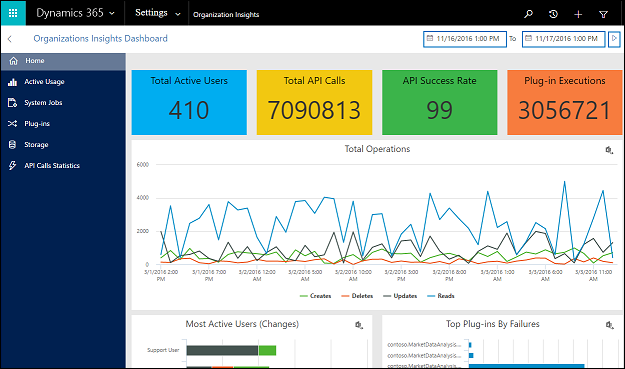
Every time a plugin / workflow is executed, a new entry in that table is created, with the Created On, Completed On, fields etc, so you could actually measure how much time a single workflow / plugin execution took. If you have an On-Premise installation, then that is just a SQL query with some groupings, if On-Line, then a data extract plus some Excel manipulation magic should be enough too or… make use of the great Organisation Insights feature in AppSource:
Are you unit testing your code? If so, how did you start unit testing legacy code? Did you use a different approach? We would love to know more about your own experiences.
Please leave a comment below.

Join the Dynamics AX User Group (AXUG) to engage 365 days a year with the largest, user-led community for companies using Dynamics AX and Dynamics 365.
AXUG provides a hub for thousands of AX user, partners and developers to exchange knowledge on how to best maximize product performance to achieve business success. Our resourceful community is powered by users, for users and specializes in the delivery of member-driven education and enriched networking – helping to boost competencies, confidence levels and connections for our members.



In the previous post we were asked by some readers about any other CRM events in Europe like CRM Saturday. Also one blog’ reader has asked us about CRM events particularly in Poland.
Like so far we identified the following CRM events in Europe:
As far I know there are not to many CRM events in Poland. We know about:
If you know anything about any other CRM’ events in Europe we would love to hear about it.
Thank you very much!